Table of Contents
CanoPy tutorial
CanoPy is the Python module for the Georgia Canopy Analysis 2009 project sponsored by the Georgia Forestry Commission (GFC). For further information about this project, please refer to the CanoPy page.
This document explains detail steps for assessing canopy using the CanoPy module and a provided sample data set. To learn more about this module, please read the CanoPy user manual. For technical details, please read the CanoPy technical manual.
Authors
Requirements
- ArcGIS Desktop 10.x
- ArcPy
- Python 2 standard module: os
We are currently planning on developing a fully open source solution without using ArcGIS and Feature Analyst.
Sample data set
The sample data will contain 3 folders titled ‘naip’, ‘data’, and ‘Outputs’. The ‘data’ folder contains the Georgia physiographic regions shapefile, the NAIP Quarter Quad (QQ) polygon shapefile in addition to the TIFF file which will be used for snapping. The ‘naip’ folder will contain 4 input QQ NAIP tiles that form a 2 x 2 area. The ‘Outputs’ folder contains the outputs that are created by Textron’s Feature Analysis software for each NAIP QQ in the sample dataset. This is included as this tutorial does NOT go over the process of using Textrons Feature Analyst but rather the process of using the CanoPy Python module.
Steps
- Either clone the repository using Git in the terminal with the below code
git clone https://github.com/HuidaeCho/canopy.git
OR visit the CanoPy GitHub repository and download the zip file.
- If you download the .zip file you will first need to unzip the file. It will be named ‘canopy-master’, rename this folder to ‘canopy’.
- Download the CanoPy sample data from this page and extract it from its .zip format.
- Make a copy
canopy_config-example.pyin the same folder and rename it tocanopy_config.py. - Edit the new
canopy_config.pywith a text editor or python ide of your choice (ie. notepad, vim, pycharm) to recognize your layers and folder structures. In this case you will set the various paramters ofcanopy_config.pyas such.phyregs_layer = 'Physiographic_Districts_GA'phyregs_area_sqkm_field = 'AREA_SQKM'naipqq_layer = 'naip_ga_2009_1m_m4b'naipqq_phyregs_field = 'PHYREGS'naip_path = '…/CanoPy_sample_data/naip'spatref_wkid = 102039project_path = '…/CanoPy_sample_dataanalysis_path_format = '%s/%%d Analysis' % project_pathanalysis_year = 2009analysis_path = analysis_path_format % analysis_yearsnaprast_path = '%s/data/rm_3408504_nw_16_1_20090824.tif' % project_path
- This will allow CanoPy to read the required data and create the required output paths for the data to be saved into.
- Open a new ArcMap 10.x document.
- Add the following files from the sample data folder to ArcMap.
- Physiographic_Districts_GA.shp
- naip_ga_2009_1m_m4b.shp
- You may notice these are the
phyregs_layerand thenaip_qqlayer from the canopy_config.py file, however for them to properly be utilized by CanoPy the data must be in ArcMap for the required spatial functions to be used.
- Open the Python window under the geoprocessing pane located on the top bar within ArcMap.
- After the Python window is open you must import the CanoPy module for ArcMap to be able to use its functions. To accomplish this use the following code.
import sys
sys.path.append('C:/path/to/the/canopy/module')
import canopy
- Most functions in CanoPy only contain one parameter,
phyreg_ids. This is the unique identifier for each physiographic region that enables the user to decide which region to process. In this case you will be using the id[3]which is thephyreg_idof the Blue Ridge Mountains region. However, to first be able to use the id’s you have to add the id’s to thenaipqq_layer. To do this simply run the following code in the Python window.canopy.assign_phyregs_to_naipqq()
- After it is finished the
naipqq_layerwill now contain thenaipqq_phyregs_fieldwhich will be titled ‘PHYREGS’ in this case. Each NAIP QQ will now have the region id’s of each region it is in. - The secondary purpose of
canopy.assign_phyregs_to_naipqqis to calculate the area in square kilometers of each physiographic region. Thephyregs_layerwill now contain thephyregs_area_sqkm_fieldwhich will be titled ‘AREA_SQKM’. The ‘AREA_SQKM’ field will be used with thegenerate_gtpointsfunction.
- Next you will assign the phyreg_ids, which in our case will be:
phyreg_ids = [3]
- If more regions were able to process you would assign those regions as such:
phyreg_ids = [3, 7, 15]
- Next you will reproject all input NAIP tiles to the projection specified by the
spatref_wkidincanopy_configwhich will be WKID-102039: USA Contiguous Albers Equal Area Conic USGS version.. Use the following code to use the reprojection functioncanopy.reproject_naip_tiles(phyreg_ids)
- Reprojected tiles with the suffix ‘rm_’ will be saved to
…/CanoPy_sample_data/2009 Analysis/Blue_Ridge_Mountains/Inputswhich will have been created by the function.
- The reprojected tiles in the Inputs folder will be used in as the inputs with Textrons Feature Analyst, however we are skipping that step, so you will want to move the
…/CanoPy_sample_data/Outputs/folder to the…/CanoPy_sample_data/2009 Analysis/Blue_Ridge_Mountainsfolder. This is where the classified outputs of Textrons Feature Analyst would have been saved to be used with the rest of the CanoPy functions.- The folder structures should now look like this:
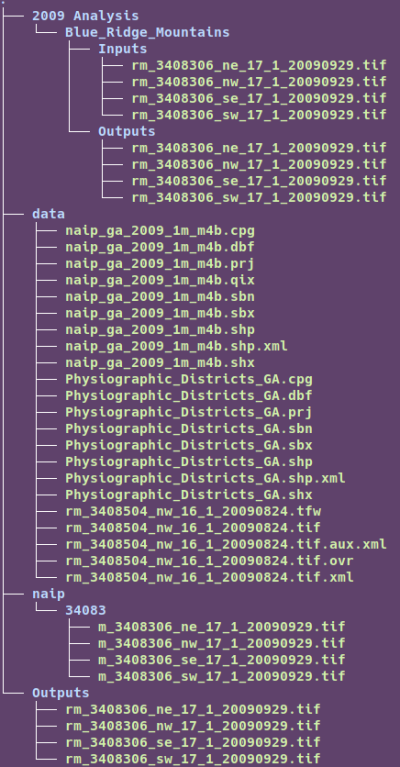
- After the 'Outputs' have been moved. The wrapper function can be used to complete the process with the following code.
canopy.convert_afe_to_canopy_tiff(phyreg_ids)
This wrapper function, titled
convert_afe_to_canopy_tiffcontains three indvidual functions. These functions areconvert_afe_to_final_tiles- Ensures all tiles are TIFF files with the values of 0 & 1. Files have prefix of 'fr_'
clip_final_tiles- Clips all tiles to the outline of their QQ to remove all edge artifacts (errors along edge of file) and make mosaicing more accurate. Files have prefix of 'cfr_'.
mosaic_clipped_final_tiles- Mosaics all clipped tiles to the shape of their physiographic region and clips the mosaic to the physiographic region boundaries.
- After running the final wrapper function the outputs folder will contain all intermediate and final 2-bit output Canopy TIFFS.